
This is my final report for Google Summer of Code 2026, where I worked on local note encryption for Joplin with mrjo118 as my mentor. The work started from my proposal, and all the PRs are listed further down.
The goal#
Joplin’s end to end encryption protects your notes on the sync server. On your own device, though, every note is plain text in the database, so anyone who opens the app can read all of it.
For notes like a journal or a medical note, that isn’t enough. So the goal was to let you lock notes with a password. A locked note stays encrypted on the device until you unlock it.
Encrypting the body came first. After that, the work moved to every other place a note’s body goes: search, sync, history, exports, shares, the API, plugins and the CLI. Each of those had to keep a locked note locked, and that’s where most of the summer went.
How it works#
You set a note lock password once in settings, and then lock any note you want. Its body gets encrypted with a key, and your password unlocks that key. The title stays readable, so you can still find the note in the list.
Once you unlock, the key stays in memory, so other locked notes open without asking again. When you’re done, use Relock all notes or quit Joplin, and they’re locked again.
Where a locked note goes#
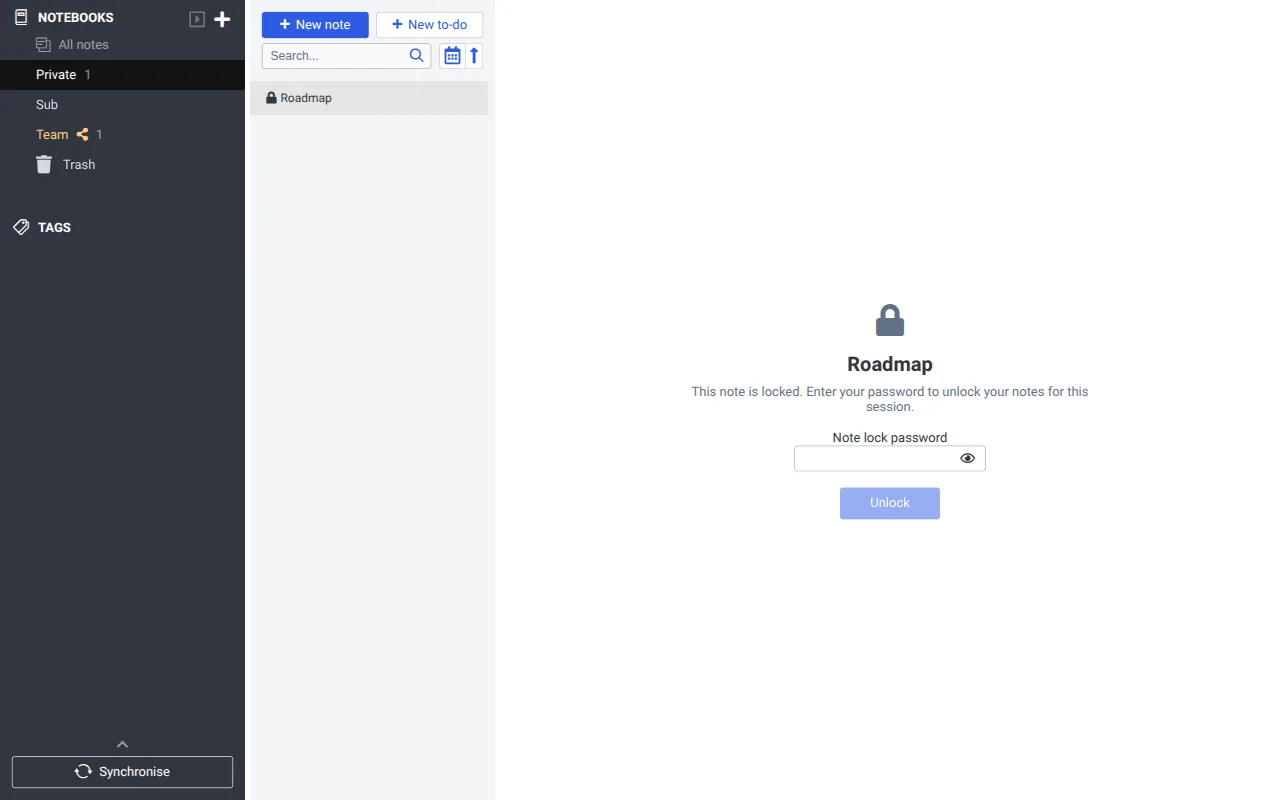
Here are the places a note’s body can end up, and what a locked note does in each one.
- On your device Body saved encrypted. The title stays readable.
- Sync Still encrypted. If you use end to end encryption, it adds its own layer on top.
- Search Left out of the search index.
- API, CLI and plugins Bodies refused, and listings return locked notes with a placeholder body.
- Note history Revisions saved encrypted.
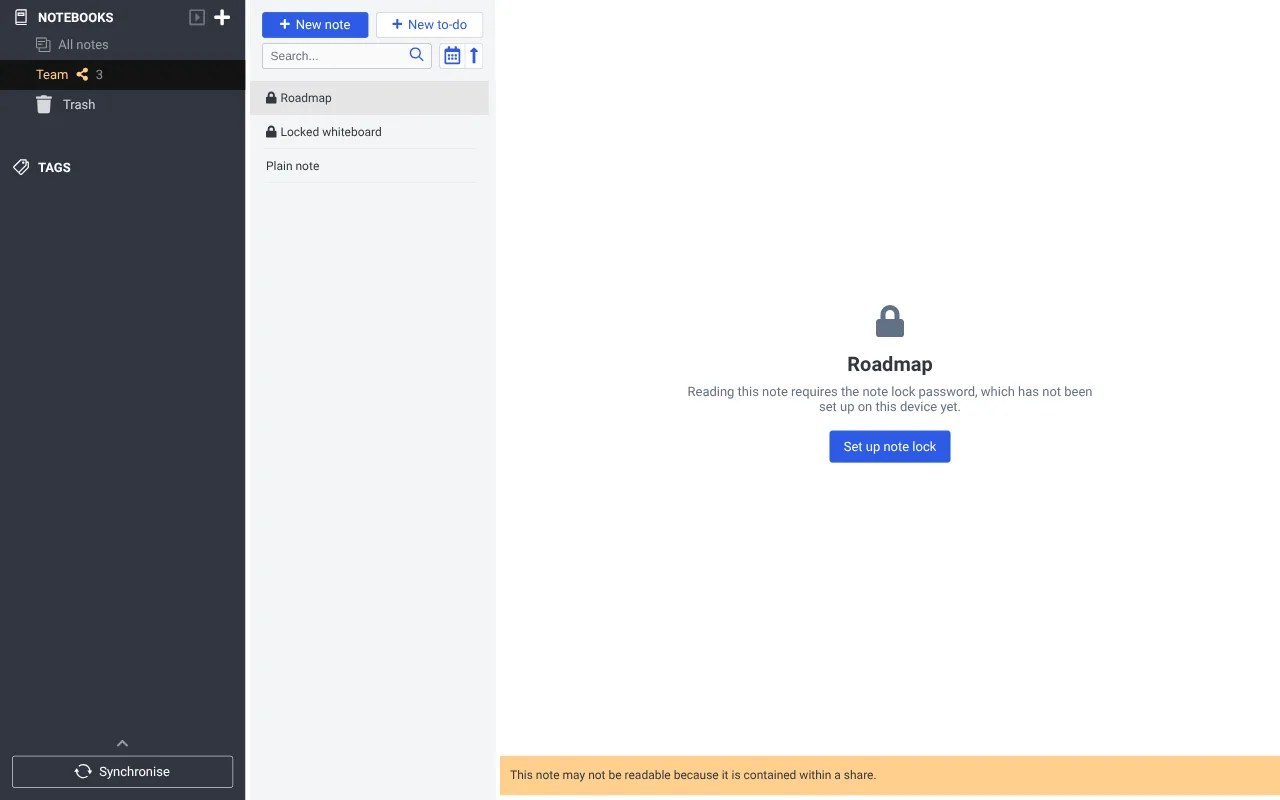
- Shared notebooks Others can't read it without the note lock key, and it stays read only there.
- Export JEX and RAW keep it encrypted. Other formats ask first.
- Attachments Built, waiting on bulk lock.
Shared notebooks are a good example. Someone you share a notebook with still gets the locked note through sync, but without the note lock key they can’t read it.
What I built#
Note lock configuration#
Before you can lock anything you need a note lock password. It’s separate from the end to end encryption password, and it’s what unlocks the note lock key.
On desktop it lives in Options, under Note lock. You set the password there once, typing it twice. After that the same screen lets you change it, by giving the current password and then the new one, and locked notes keep opening with the new password. If you forget it, Forgot password? resets it, after a warning that notes locked with the old password can’t be read anymore. If the key uses an older encryption method, the screen also offers to upgrade it.
The screen also has Auto relock when switching notes. It’s off by default. When it’s on, the session locks again every time you move to another note, so each locked note asks for the password when you open it.
On mobile, Configuration has the same Note lock section, with the password setup and the same auto relock option. Changing and resetting the password on mobile is in review. (#15852, #15963, #16931)
Locking and unlocking#
This is the main part: you pick which notes need protecting, and only those get locked.
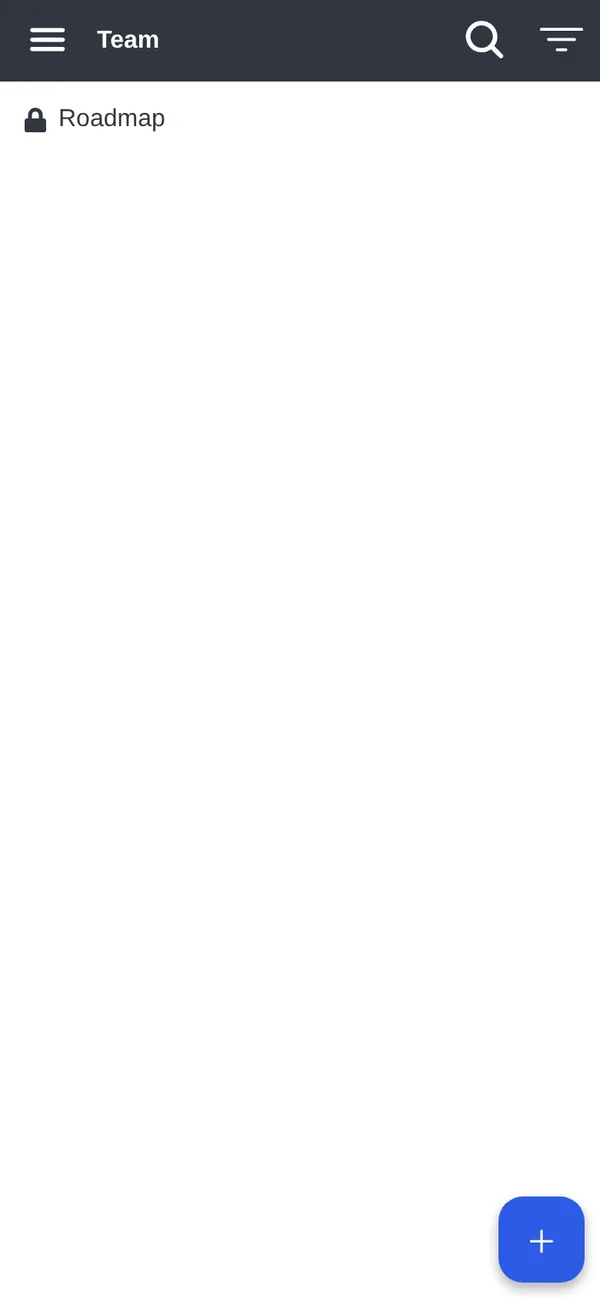
On desktop you lock a note with Lock this note in the Note menu, and on mobile from the ⋮ menu of the open note. The note’s body gets encrypted, and it shows a padlock in the note list. If no password is set up yet, Joplin offers to set one up first.
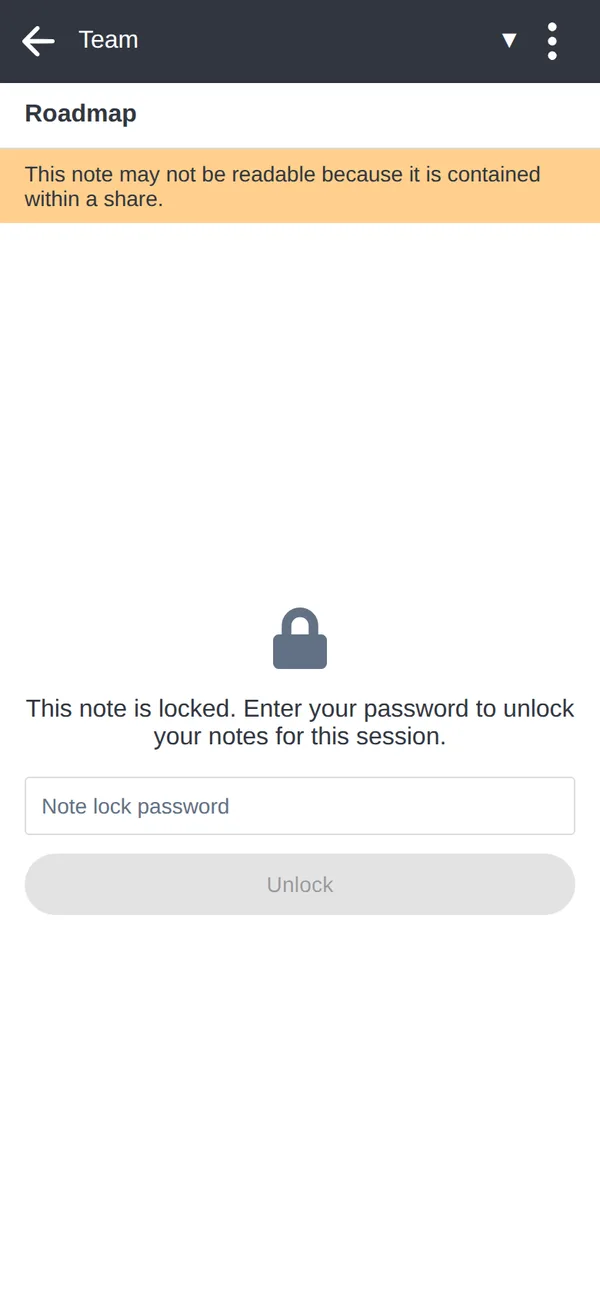
Opening a locked note shows an unlock panel instead of the body. Typing the password once unlocks the session, so other locked notes open without asking again. To lock them all again, use Relock all notes, which is in the Note menu on desktop and in the ⋮ menu of an open note on mobile. Quitting Joplin locks them too, and so does switching notes if auto relock is on. Remove note lock turns a locked note back into a normal one. (#15961, #16069)
Note lock key migrations#
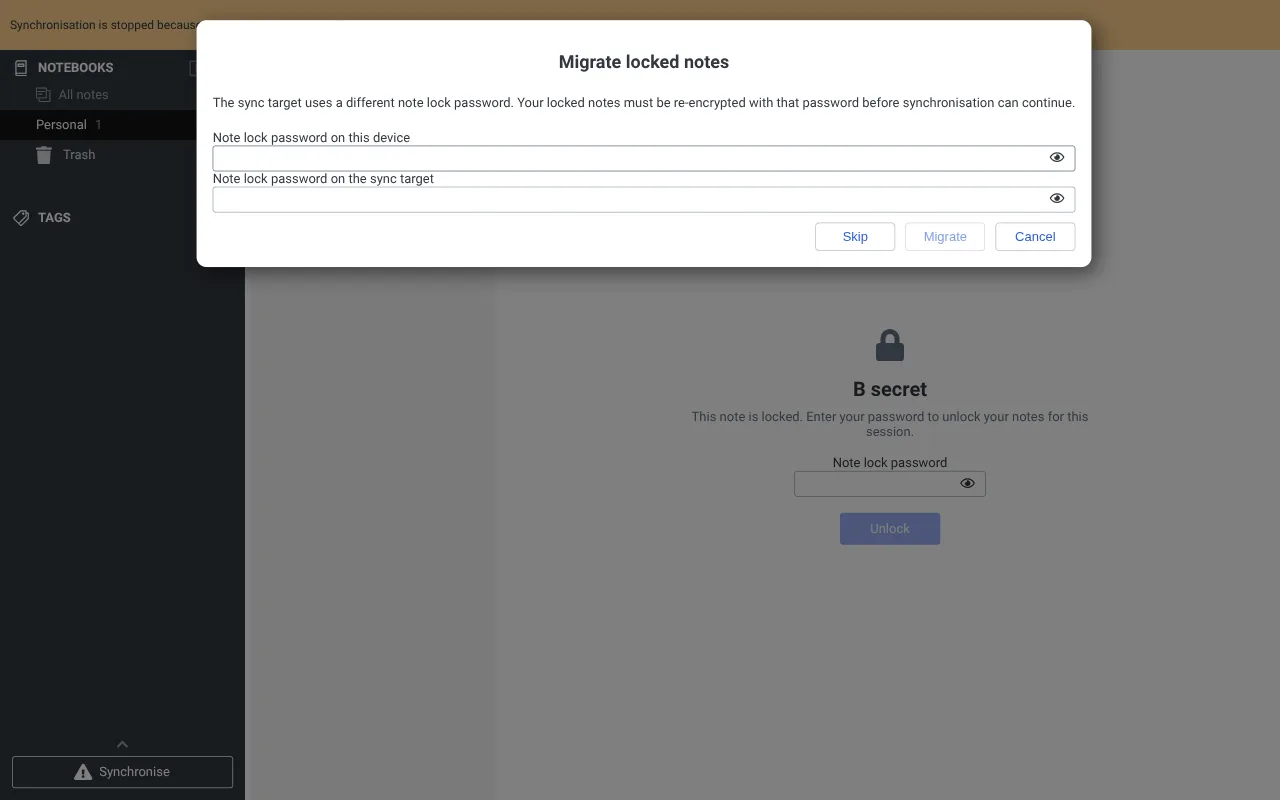
A bug was found during development that could lose notes for good. If a new device set up note lock before its first sync, it made its own key. When it then synced with a target that already had a key, sync kept only the newer of the two, and every note locked with the other key could never be opened again.

A note lock key migration fixes this. When sync finds that the sync target uses a different key from the one this device’s locked notes need, it stops and asks for both passwords, the one on this device and the one on the sync target. Joplin then decrypts each locked note with the old key and encrypts it again with the synced key. Once every note has moved, sync starts again and both devices share one key. If no note on the device needs the old key, the synced key is just used without asking. It was reported in #16382 and fixed in #16723.
The option to skip notes which failed migration is also provided. Those notes stay on the old key, so they can’t be read on this device anymore. Because of that it warns first, and suggests exporting a JEX backup, which can be imported again later with the right password. Note history of locked notes isn’t migrated either, and a warning about that on the migration screen is in review (#16960).
Note history#
Joplin keeps old versions of every note, and for a locked note those versions hold the same text, so they need the same protection. Every save of a locked note makes a whole new encrypted body, so the usual diff based history doesn’t work for it.
Locked notes now keep full encrypted revisions. The history viewer shows the same unlock panel as the note, and once the session is unlocked you can read an old version and restore it. Restoring keeps the note locked, and restore and delete history stay disabled until you unlock. (#16476)
Export and import#
Exports are another way a note’s text leaves the app, so they had to know about locked notes too.
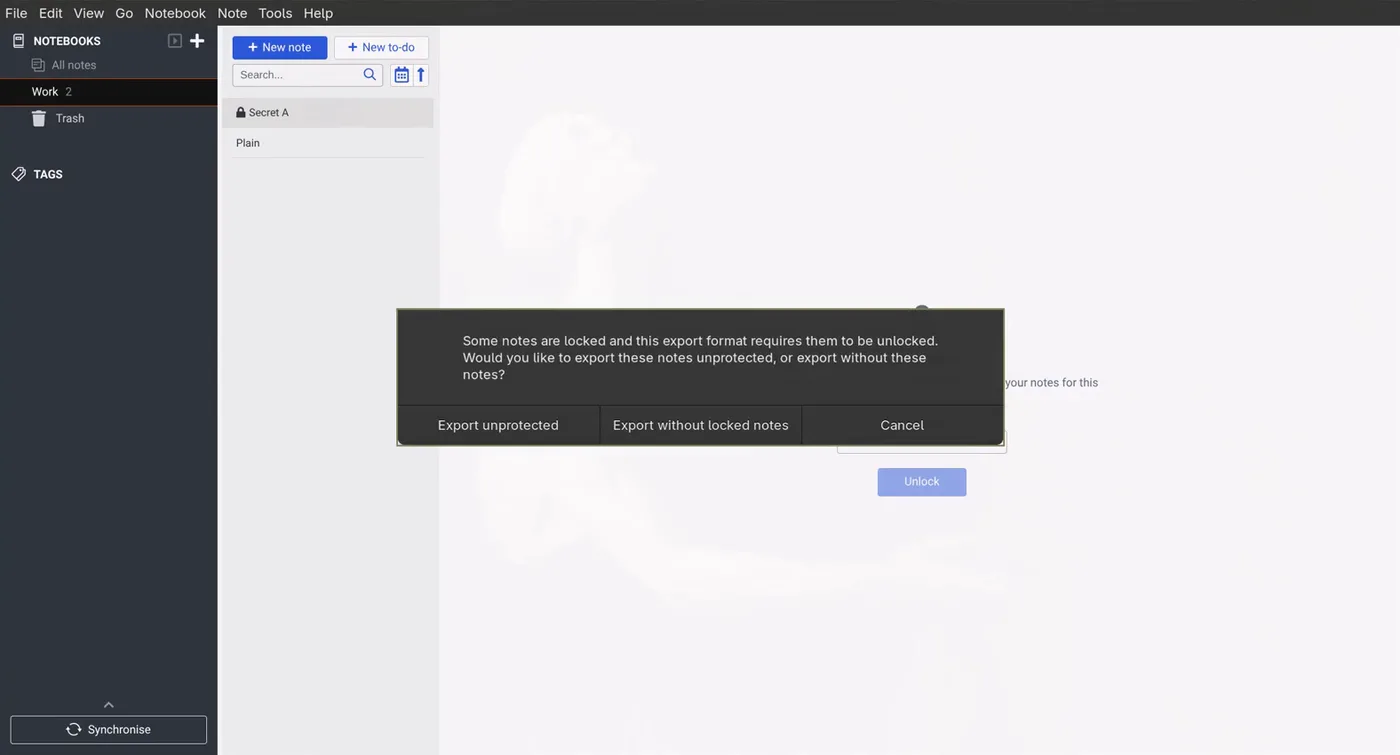
JEX and RAW backups keep locked notes encrypted, and include the encrypted note lock key, so a backup plus the password is enough to get the notes back. Markdown, HTML, PDF and the other formats can’t keep a note encrypted, so Joplin asks first: export the locked notes unprotected, export without them, or cancel. If the session is locked it asks for the password too.
When you import a backup that was locked with a different key, Joplin asks whether to update those notes to your current key. If you say yes, it asks for the backup’s password and moves them over. (#16785)
Bulk lock#
Locking notes one at a time gets slow when a whole notebook needs it.
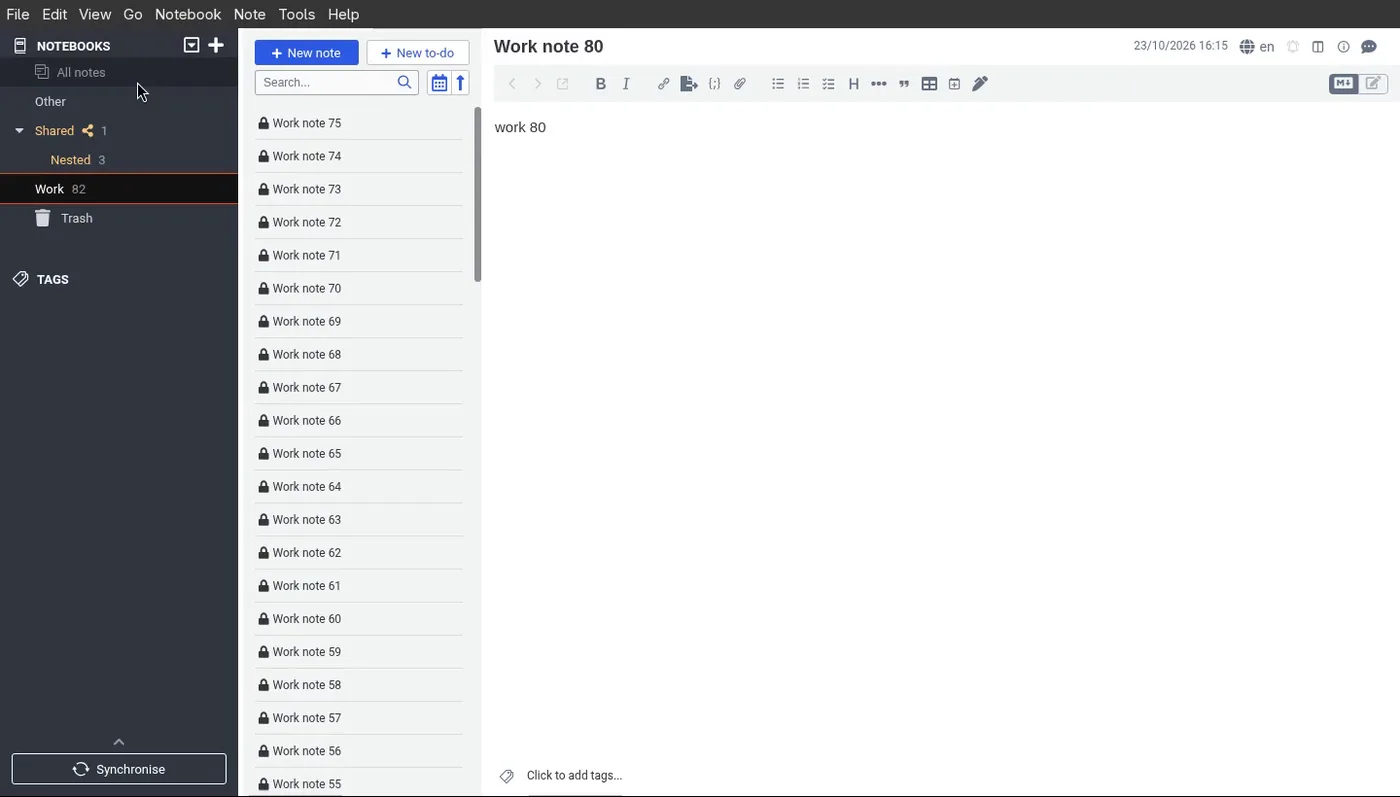
The notebook menu on desktop and mobile has Lock all notes and Remove lock from all notes, which cover the sub-notebooks too. On desktop, when several notes are selected, there’s also Lock these notes and Remove note lock from these notes. A banner shows while it runs. This one is in review. (#16945)
Locked note restrictions for plugins, API and CLI#
The editor isn’t the only thing that reads and writes notes. Plugins, the data API, the CLI and external editors do too, and none of them can use the note lock password. If they could write to a locked note, they could corrupt it or save plain text over the encrypted body. So they are restricted for locked notes:
- The data API and the CLI refuse to read or change a locked note’s body, and can’t change its lock. Listings still return locked notes, with a placeholder body. (#16098, #16932)
- Editor plugins are turned off for locked notes on desktop and mobile, and their toggle button goes away. (#16932)
- External editing can’t be started for a locked note, and it stops if another device locks the note. (#16762)
Full support, so plugins and the API could work with a locked note while the session is unlocked, was too big for this project’s scope. It could come later.
Smaller fixes#
Along the way I fixed a few smaller bugs too. One was a failed save that made every later save of that note hang until a restart (#16147), and the others were a flaky test and a first render bug. I also reported a sync bug where a note moved on another device jumps back to its old notebook if you’re typing in it.
Where it is now#
Note lock works on desktop and mobile. For now it sits behind a feature flag (featureFlag.noteLock) until it’s turned on for everyone.
Merged (23)
| PR | What it does | Why |
|---|---|---|
| #15557 | Database fields for locked notes | A locked note needs a flag, and a place to keep its attachment ids once the body is encrypted. |
| #15673 | Note lock key and the encrypt and decrypt path for saves and loads | Everything else builds on it: a note lock key, and a separate save and load path that encrypts and decrypts. |
| #15717 | Index the resources of locked notes | The body is ciphertext, so the scanner couldn’t see its attachments, and they could look unused and get deleted. |
| #15730 | Hide private feature flags on mobile | Mobile showed private feature flags in its settings, which desktop already hides. |
| #15756 | Keep locked notes out of search | A locked note’s text shouldn’t turn up in search or the AI search. |
| #15773 | Unlock session state | The plan moved from an unlock timer to unlocking and locking yourself, so the key needed a session state. |
| #15852 | Desktop note lock settings | You need a place to set, change or reset the password before you can lock anything. |
| #15963 | Mobile note lock settings | So the password can be set up on mobile too. |
| #15961 | Desktop lock and unlock UI | The actual locking: menu actions, the padlock in the list, and the unlock panel. |
| #16100 | Skip the session effect on first render | The note was loaded twice when opened, and it made a test fail now and then. |
| #16147 | Release the save lock when a save fails validation | One failed save made every later save of that note hang until a restart. |
| #16098 | API, CLI and desktop refuse unsafe access to locked notes | Outside the editor, the API, CLI and Convert to Markdown could leak or overwrite a locked note. |
| #16292 | Lock wording for actions and messages | The menus mixed “encryption” and “lock” for different things, which was confusing. |
| #16069 | Mobile lock and unlock UI | The same lock and unlock flow on mobile. |
| #16499 | Fix a flaky note menu test | A mobile test mixed real and fake timers and failed at random. |
| #16476 | Note history for locked notes | Diffs of ciphertext are useless, and old versions shouldn’t be readable without the password. |
| #16725 | Note list padlock label and colour | Screen readers didn’t say a note was locked on desktop, and the mobile padlock was hard to see. |
| #16131 | Encrypt plain text bodies on ungated saves | A decrypted body passed to a normal save would have been written as plain text on a locked note. |
| #16762 | Stop external editing when a note gets locked on another device | External editing kept going after another device locked the note, with no way to stop it. |
| #16579 | Locked notes inside shared notebooks | A locked note can still end up in a shared notebook through sync, and its lock data could be lost there. |
| #16723 | Migrate locked notes when the sync target has a different key | Sync kept only one key, so notes locked with the other one could never be opened again. |
| #16785 | Export and import of locked notes | Backups had no key to open them, and other formats wrote out the ciphertext. |
| #16932 | Turn off editor plugins for locked notes, placeholder body in the API and CLI | Editor plugins save through the API, which refuses locked notes, so their changes were lost. The API also just hid locked notes. |
In review#
These three are approved by mrjo and waiting on a final review.
| PR | What it does | Why |
|---|---|---|
| #16945 | Bulk lock and unlock for notebooks and selected notes | Locking a whole notebook one note at a time is slow. |
| #16931 | Change and reset the note lock password on mobile | Changing or resetting the password could only be done on desktop. |
| #16960 | Warn that note history isn’t migrated | Note history isn’t moved to the new key, and the screen didn’t say so. |
Not merged#
One PR didn’t make it. #16381 tried to keep locked notes out of shared notebooks completely, but a note can already arrive in a share through sync, so blocking it wasn’t enough. I closed it, and #16579 handles shared notebooks properly instead.
What’s left#
All the core requirements of the project are done and merged. Everything still in review or in development is stretch work:
- In review: bulk lock (#16945), changing and resetting the password on mobile (#16931), and the history warning on the migration screen (#16960).
- Attachments. Locking a note should lock its images and files too. It’s in development on my fork (keshav0479/joplin#8, issue #16961), built on top of bulk lock.
- Re-encrypting all locked notes with the same key, so notes can be moved to a better encryption method when one is added to Joplin.
Two things are left before note lock can reach everyone:
- User docs, once note lock ships in a release.
- Turning the flag on for everyone.
Challenges and what I learned#
The biggest thing I learned is how much communicating early helps. College doesn’t stop for GSoC. There are exams and events, and telling mrjo about them in advance gave me room to plan around them instead of piling everything on myself at the last minute. The project also got extended from 12 to 22 weeks, which gave me time to polish things properly.
I also used AI agents a lot this summer, to hunt for bugs and to write the code, while I made the calls on what went in. That taught me how much the human part still matters. Someone has to decide what’s good, what needs more work, and when it’s ready to approve, and mrjo’s and Laurent’s reviews did that every time. Getting better at driving the agents, and at checking what they gave back, helped the most.
Thanks#
Thanks to mrjo for the close reviews and testing on real devices all summer, and for helping me through the hard parts. Thanks to Laurent for reviewing and merging, to Henry for his reviews, and to everyone on the forum who followed along.
Daily journal, Apr 30 to Aug 2
A running note from my Google Summer of Code project with Joplin.
Joplin already protects notes while they sync. This project adds a separate way to lock a note on the device too.
I am starting with individual note locking, then making the surrounding paths such as history, search, attachments, mobile, CLI, and the API handle locked notes safely.
Aug 2#
Worked through the guardrails feedback. API listings now skip locked notes entirely, convert to Markdown works once the session is unlocked, and the CLI refuses to flip the lock flag with a proper error instead of a stack trace. The revisions branch got its one-line change too, plain history now restarts when encryption comes off a note.
Aug 1#
Pushed the mobile review fixes, the undecryptable note screen and the new menu icons. Right after the push the power went out and the laptop died with it. One commit didn’t survive, though I only found that out the next day.
July 31#
The mobile lock UI and revisions PRs both came back reviewed the same morning. Split the flaky test fix into its own PR and it merged the same evening. Guardrails went up on the main repo too, then straight into draft with a list of API questions to settle.
July 30#
Moved the mobile lock UI over to the main repo, fresh branch off dev with the reviewed work as one commit.
July 28#
The desktop lock UI merged. Biggest piece of the project so far.
History restore and delete now grey out while a note is waiting for its password, and every dialog that asks a question answers in Yes and No now.
July 27#
The mobile config screen merged overnight. Spent the day on Laurent’s review of the desktop PR, the real fixes were the enable flow rerunning itself from the config screen and a read-only flag that was global when it should have been per window.
July 24#
The project got extended to early November on the portal. Exams eat mid August, so the runway helps.
July 17#
The lock UI went up on the main repo. The mobile config screen also came back as a normal section, quick rebuild now that the desktop pattern it needed is merged.
July 16#
The config screen merged overnight. First visible piece of this project in the main app.
Barely slept for it though. Argentina England semis at four in the morning, Messi still doing Messi things. Back to back, lessgo.
July 15#
Another review round on the lock UI, and some small polish on the config screen.
July 13#
More review on how locked notes load. Also filed an issue for a small gap I noticed in the existing E2EE reset flow.
July 12#
Reworked the locked note loading so the panel shows without creating any editor state. Simpler and it fixed some flashing. Also got the mobile side of locked notes working locally.
July 11#
A simplify wave from mrjo on both PRs, mostly deleting my defensive code. Less code, better code.
July 10#
Pushed both reworks, the config screen as a normal Options section and the full review round on the lock UI PR. Both are back in review now.
July 9#
The lock UI PR went up just after midnight, with demo videos this time. Reviews came in the same day, Laurent on the config screen and mrjo with the biggest review of the project so far. Most of it was me hardening cases we had already accepted in the risk assessment.
July 8#
Squashed the desktop lock UI into one commit. Also submitted my midterm eval.
July 7#
The lock UI works end to end locally now. Locked panel, manual lock, and the auto lock setting actually doing something.
July 6#
Replanned the remaining weeks with mrjo. Bulk encrypt/decrypt is in, resource encryption is a stretch goal now. Core solid first.
July 5#
The session PR merged overnight, and both config screen PRs went up in the main repo, desktop and mobile.
July 3#
Another quick review pass on the settings screen, just labels and spacing this time.
July 2#
Reworked the settings screen after the first review. Dropped the action dropdown for a plain reset link that flips into reset mode. Also made unlock throw when it fails instead of quietly returning false.
July 1#
More key scoping, on the encrypt side now. The main bit was making the shared encryptor fail closed when the key has rotated under it.
June 29#
Tightened where the decrypted key lives. It used to stay around after unlock, now it only goes to the encrypt or decrypt call that needs it.
June 28#
Split the note lock code in two, the key on one side and the session state on the other. Also started the desktop settings screen.
June 27#
Review fixes on the session PR, mostly cleaning up the key state after an export finishes.
June 26#
Another proposal cleanup day.
The old unlock timeout idea is gone now. Explicit Unlock encrypted notes / Lock encrypted notes feels easier to reason about, and there will be an optional Auto lock when switching note setting for people who want that behaviour.
June 25#
Export came up today, and it was a good catch.
If a backup keeps notes locked, restoring it later can depend on a key that might not exist anymore. So exports should write them out as normal unlocked notes after decrypting them.
June 24#
The search/indexing PR merged today.
This one also ended up covering the new AI embedding index, not just normal search. Nice to have both following the same rule.
June 23#
Good day for small PRs. The attachment indexing PR merged, and the mobile feature-flag fix merged too:
The feature-flag fix was tiny, but useful. A private flag was showing on mobile, so mobile now filters settings the same way desktop does.
June 22#
Went back through the plan with the repo in its current state. Since PR1 and PR2 are merged now, the next PRs can be smaller and independent, which should make review less tangled.
June 21#
Spent time on ResourceService review fixes. Mostly small cleanup around extracted_resource_ids.
June 20#
Kept the attachment indexing PR moving through review. The main thing was making sure saved resource IDs still go through Joplin’s existing validation instead of trusting them directly.
June 19#
Opened the third PR today. A locked note’s body is ciphertext, so the normal resource scanner cannot see its attachment links. The change rebuilds those associations from the resource ids saved before encryption.
Also tested the same path after sync with two profiles.
June 18#
The backend PR merged today. One last fix made the decrypt helper return a copy instead of changing the loaded note object.
Then finished the ResourceService change and its manual test for the next PR.
June 16#
Answered another backend review pass. Clarified why useNoteLock is opt-in: normal loads return the persisted body, which is ciphertext for a locked note, and only unlock-aware callers should request plaintext.
June 14#
Applied another set of backend review fixes. Replaced the local resource-id regex with Joplin’s existing isItemId helper and tightened the missing body and lock-state checks.
June 13#
Posted the week 3 forum update. The backend PR is now open in the main repo, targeting dev like a normal PR instead of sitting stacked on a fork branch. A week of review and cleanup, and the whole path feels much more solid than it did last Friday.
June 12#
Last round of review on the backend draft: five small comments, all fair. Applied them, restacked the branch onto the freshly merged dev so the diff is only this week’s slice, and ran the whole checklist again.
June 11#
The schema PR merged. First gsoc code in Joplin’s dev branch. Also pushed the reworked backend branch: the new naming everywhere, and the gated save stripped of its clever recovery logic.
June 10#
Simplified the gated save path after a review pass. My first version tried to recover from weird partial states, like a save missing the lock flag. But a gated save missing the lock state is really a bug in the caller, so it should fail loudly there instead of quietly saving something wrong. Less code, clearer rules.
June 9#
The schema PR got reviewed, and the naming changed for the better. is_locally_encrypted is gone, because “local” stops meaning anything once a note syncs somewhere. It is just is_locked now. That pulled the backend naming along with it: noteLock, NoteLockKey, NoteLockService. I like it more. Locked is the feature, encryption is just how it works underneath.
June 6#
Pushed the structure changes to the week 2 draft. Also did the E2EE manual pass with two clean profiles: encrypted note and attachment one way, edit back the other way. Good kind of boring.
June 5#
Posted the week 2 forum update. This week was mostly backend work: local key path, gated save/load, and making sure history does not quietly keep old readable copies after a note is locked.
June 4#
Kept the week 2 draft moving on the fork. Branch chaining is useful, but I can already see why keeping only one chained PR open matters.
June 3#
Opened the tracking issue and put the backend PR up as a draft, stacked on the schema work so the diff only shows this slice. Early feedback while it is still small.
Still all backend. No lock button yet, nothing a user can press. That comes once this path is solid underneath.
June 2#
Spent the day trying to break it. The cases I care about are the quiet ones: a damaged or half-written locked note should fail closed and leave the note and the database untouched, not save something broken.
Also the history. When a note first gets locked, the old plaintext revisions have to go, or the thing you just locked is still sitting there in its edit history. Easy to forget, bad to miss.
June 1#
Pulled the week 2 work into one backend PR instead of splitting it: the encryption service key path, the local key wrapper, and the gated note load and save. They only really make sense together.
The schema PR has not merged yet, so this one stacks on top of it as a draft. Building on a branch that is not in yet is a little awkward, but it keeps the diff small and honest about what depends on what.
May 30#
Took the schema testing a bit deeper, following a suggestion from mrjo. Checked that revisions still get created after the new column, and looked at the raw items on disk with E2EE on. The note body is an unreadable blob while is_locally_encrypted stays a plain 0 next to it.
Good way to learn where to actually look when testing a different part of the app.
May 29#
Manual pass of the PR on desktop. Two profiles syncing through a file system target, with a notebook, a few notes and an image, round-tripping both ways.
Getting the dev build to cooperate took longer than the test itself. Also posted my first weekly update on the forum, planning to do one every Friday.
May 28#
The first PR is up now. It is just the schema and sync metadata layer, which is exactly where this had to start.
It is a small start, but it feels good to have the first piece out in the open.
May 27#
Spent the day studying the schema and sync paths properly before opening the PR. A small database field does not stay small for long in an app like Joplin. It shows up in local tables, generated types, sync serialization, E2EE metadata, API responses, and server tests.
Also cleared up one detail for the upcoming encryption service work. The local-note wrapper needs the decrypted key and the key id together, but it does not need to carry the whole master key object around.
May 26#
Spent the day getting the clean dev repo into a working shape and turning the plan into an actual PR order. The goal is still small reviewable pieces, not one giant feature dump.
Also started keeping project learning notes alongside the code. I want to understand the Joplin paths as I touch them, not just move files around and hope the tests are kind.
May 25#
Coding starts today. The first thing is not the lock screen, even though that is the tempting part. It is the plumbing: schema and sync fields, old sync items mapping cleanly to the new shape, and the local note encryption key storage path.
Boring on purpose. I would rather get the data shape right before there are buttons people can press.
May 24#
Finished the last planning pass across the proposal, weekly plan, and risk assessment. The biggest cleanup was the key story. Local note encryption now has its own key path, separate from the normal sync E2EE master keys, with the encrypted key stored separately and only the decrypted key kept in memory after unlock.
Also made the feature guard more concrete: during development, the local encryption entry points should only be enabled in dev mode, so prerelease users do not run into a half-built lock feature by accident.
Also updated the diagrams so they match the text again.
May 23#
Spent most of the day on another proposal/risk pass. The annoying bug today was attachments. If a locked note hides its markdown body, Joplin can no longer see the resource links inside it, and orphan cleanup might later delete an attachment that is still used by that locked note.
The fix we settled on is pretty small: save the linked resource ids before encrypting the body, then let the resource indexer use those ids later. Small column, but it avoids a nasty data loss case.
May 22#
Went through another mentor review pass. I had one thing wrong: the lock flag should stay as cleartext sync metadata, not be hidden inside the E2EE payload. That way a synced client knows a note is locked as soon as it downloads the item.
Also shuffled a few things into better places. Null-byte failures go with conflict/leak testing, revision cleanup belongs on the save/sync transition, and plugin/API paths should fail closed instead of trying to be clever.
May 21#
Updated the proposal from the review and finished the week by week plan, then sent both off. Now starting a risk assessment for the project. This one touches a lot of the app, and it is people’s actual notes, so it is worth writing down plainly what could break, who it would hit, and how we would even know. Better to stare at the worst case now than find it later.
May 20#
Read a Joplin PR that landed about saving notes that contain a null byte. It made something click. Taking encryption off a note is not just decrypt and done, the save right after can still fail. If it does, the note and the editor cannot be left half changed. That kind of quiet data loss is exactly what I want to catch before it ever ships, so it goes straight onto the testing list.
May 19#
A week until coding starts. I am turning the plan into a week by week version, walking the proposal section by section so nothing quietly falls off. Re-reading your own work is humbling. You always find the parts you waved past the first time.
May 15#
Settled how I want to contribute. Small PRs, straight to dev. The one thing to front-load is the schema work, all of it in one go, so a prerelease never ends up holding half a schema. Easy to miss, painful to unpick later.
May 14#
First intro call today. Laurent, mrjo, the other mentors, and the selected students were all there.
Nice to finally see faces. I also had a 1-1 with mrjo after the call. He was very kind, and I left feeling glad this is the group I get to learn with.
May 7#
The sync side got simpler today, which is the kind of small thing that makes a hard week feel less hard. A full vault/private-notebook model is too much for v1. It can wait.
May 5#
Spent the day re-reading the proposal and the old forum threads, walking through the parts of the codebase this will touch. Mobile, CLI, and API are easy to forget when you live in the desktop app. They shouldn’t be.
Apr 30#
Got selected.
Happy. A little stunned. Now to actually do the work.